
01Ne değişti?What changed?
Eski App Store'da ürün sayfanız ikon, başlık, açıklama ve ekran görüntülerinden oluşuyordu. Bunların düzeni ve görünümü tamamen Apple'ın sistemine bırakılmıştı; elinizdeki tek görsel kaldıraç ekran görüntüleriydi.
On the old App Store, your product page was an icon, a title, a description and screenshots. Their layout and look were entirely Apple's call; the only visual lever you really had was the screenshots.
Yeni yapıda iki kritik alan geliştiricinin eline geçiyor:
Under the new design, two critical areas move into the developer's hands:
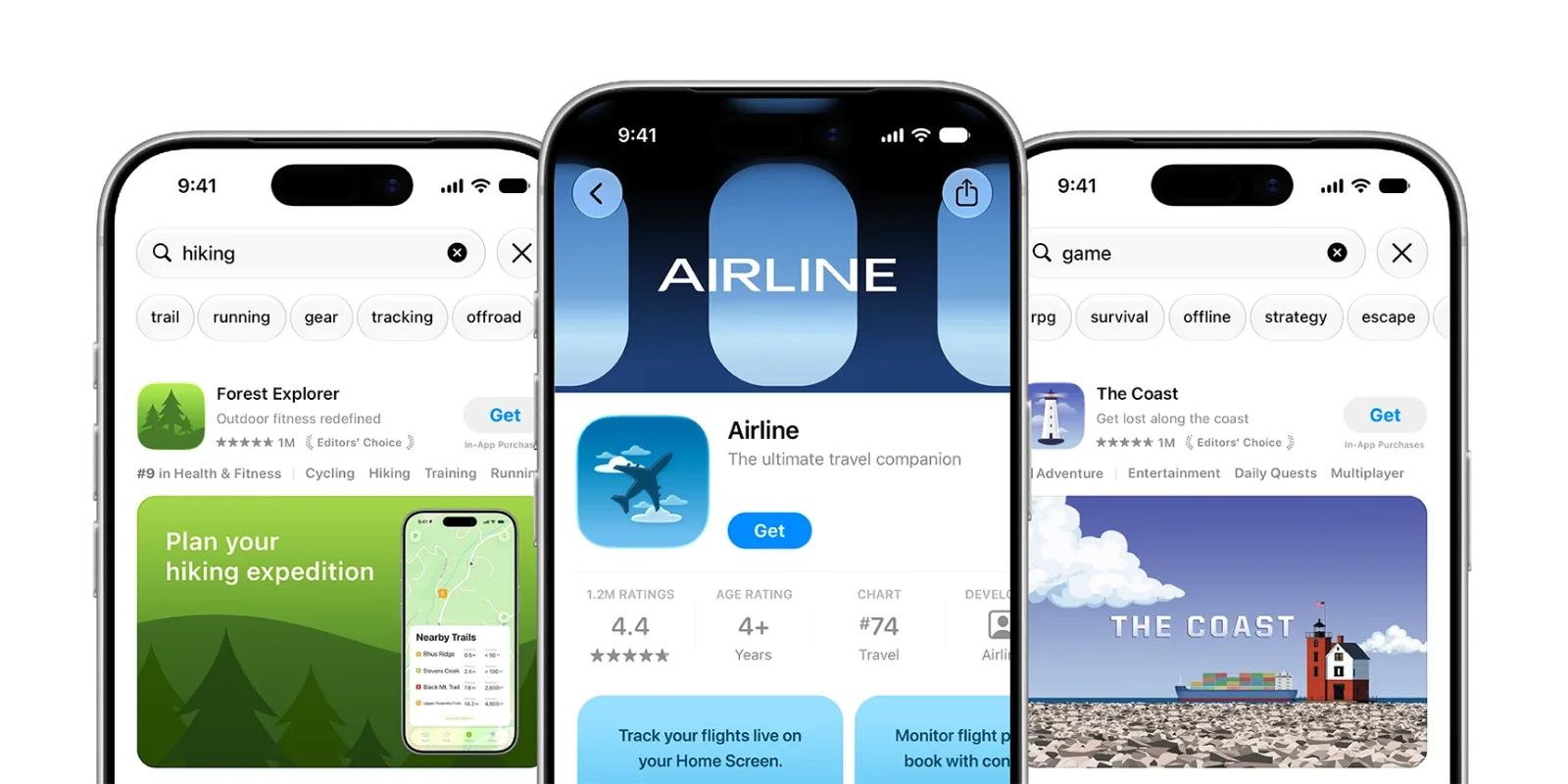
- Ürün sayfası header'ı (Product Page Header): Biri ürün sayfanıza girdiğinde ilk gördüğü bölge. Video ya da statik görsel olabilir; markanızı, yeni bir özelliği veya sezonluk bir kampanyayı öne çıkarmak için kullanılır.
- Product page header: the first thing someone sees when they open your product page. It can be video or a still image, and it is where you put your brand, a new feature or a seasonal campaign up front.
- Arama sonucu görseli (Search Results Asset): App Store'da arama yapıldığında, uygulamanız listelenirken ikon ve başlığın yanında gösterilen geniş görsel alan. Kullanıcı bunu ürün sayfanıza gitmeden önce görüyor.
- Search results asset: the wide visual shown next to your icon and title when your app is listed in App Store search. The user sees it before they ever reach your product page.
İkisi de iOS 27 ve iPadOS 27 ve sonrasında aktif. Daha eski sürümlerde eski görünüm korunuyor — yani kullanıcılarınızın bir kısmı bir süre daha eski sayfayı görecek ve ekran görüntüleriniz önemini korumaya devam ediyor.
Both are live on iOS 27, iPadOS 27 and later. Older versions keep the previous layout — so part of your audience will see the old page for a while yet, and your screenshots still matter.
02Üç asset türüThree asset types
1. Ürün sayfası header'ı1. Product page header
Ürün sayfasının üst kısmını tamamen kaplayan bu alan, uygulamanızı ilk kez keşfeden biri için en kritik saniye. Apple'ın önerileri net:
This area spans the top of the product page, and it is the most important second for someone discovering your app for the first time. Apple's guidance is clear:
- Tek ve net bir fikre odaklanın. Görsel olarak kalabalık bir header etkiyi azaltır. Sayfaya ilk kez gelen biri için en çarpıcı olan şeyi seçin.
- Focus on one clear idea. A visually busy header dilutes the effect. Pick whatever is most striking for someone landing on the page for the first time.
- Video da statik görsel de çalışır. Video seçerseniz poster frame'i (video başlamadan önce görünen kare) dikkatle seçin — kendi başına da anlamlı durmalı. Ses çoğu durumda varsayılan olarak kapalı; videonun sessizken de çalışması gerekiyor.
- Video and still images both work. If you choose video, pick the poster frame — the frame shown before playback — with care; it has to stand on its own. Audio is muted by default in most cases, so the video has to work silently first.
- Universal asset kullanabilirsiniz. Header ile arama sonucu görselini tek bir tasarımdan üretmek mümkün. Marka tutarlılığı sağlar, üretim sürecini kısaltır.
- You can use a universal asset. One design can serve as both the header and the search results asset — consistent branding, and a shorter production cycle.
2. Arama sonucu görseli2. Search results asset
Arama sonuçlarında kullanıcı genellikle belirli bir şey arıyor. Bu yüzden bu görselin tek görevi var: uygulamanın ne işe yaradığını tek bakışta anlatmak.
In search results, the user is usually looking for something specific. So this image has exactly one job: make what the app does obvious at a glance.
- Zekice değil, net olun. Kategoriniz ve ana işleviniz anında anlaşılmalı. Apple'ın ifadesiyle: bariz olanı söyleyin.
- Be clear, not clever. Your category and core function should read instantly. In Apple's words: state the obvious.
- Arayüzü gösterin. Soyut bir marka görseli yerine uygulamanın içinden gerçek bir ekran, indirme kararını hızlandırıyor.
- Show the interface. A real screen from inside the app speeds up the download decision far more than an abstract brand visual.
Arama sonucu görseli eklemezseniz In-App Event'leriniz, app preview'larınız ve ekran görüntüleriniz görünmeye devam ediyor. Yani alan zorunlu değil — ama rekabetçi bir kategorideyseniz boş bırakmak, kullanıcının ilk gördüğü görseli rakibinize bırakmak demek.
If you do not add a search results asset, your In-App Events, app previews and screenshots keep appearing instead. So the slot is optional — but in a competitive category, leaving it empty means handing the first image a user sees to your competitor.
3. In-App Events3. In-App Events
In-App Events zaten vardı; yeni yapıyla birlikte event kartları için de creative asset desteği genişledi.
In-App Events already existed; the new system widens creative asset support to event cards as well.
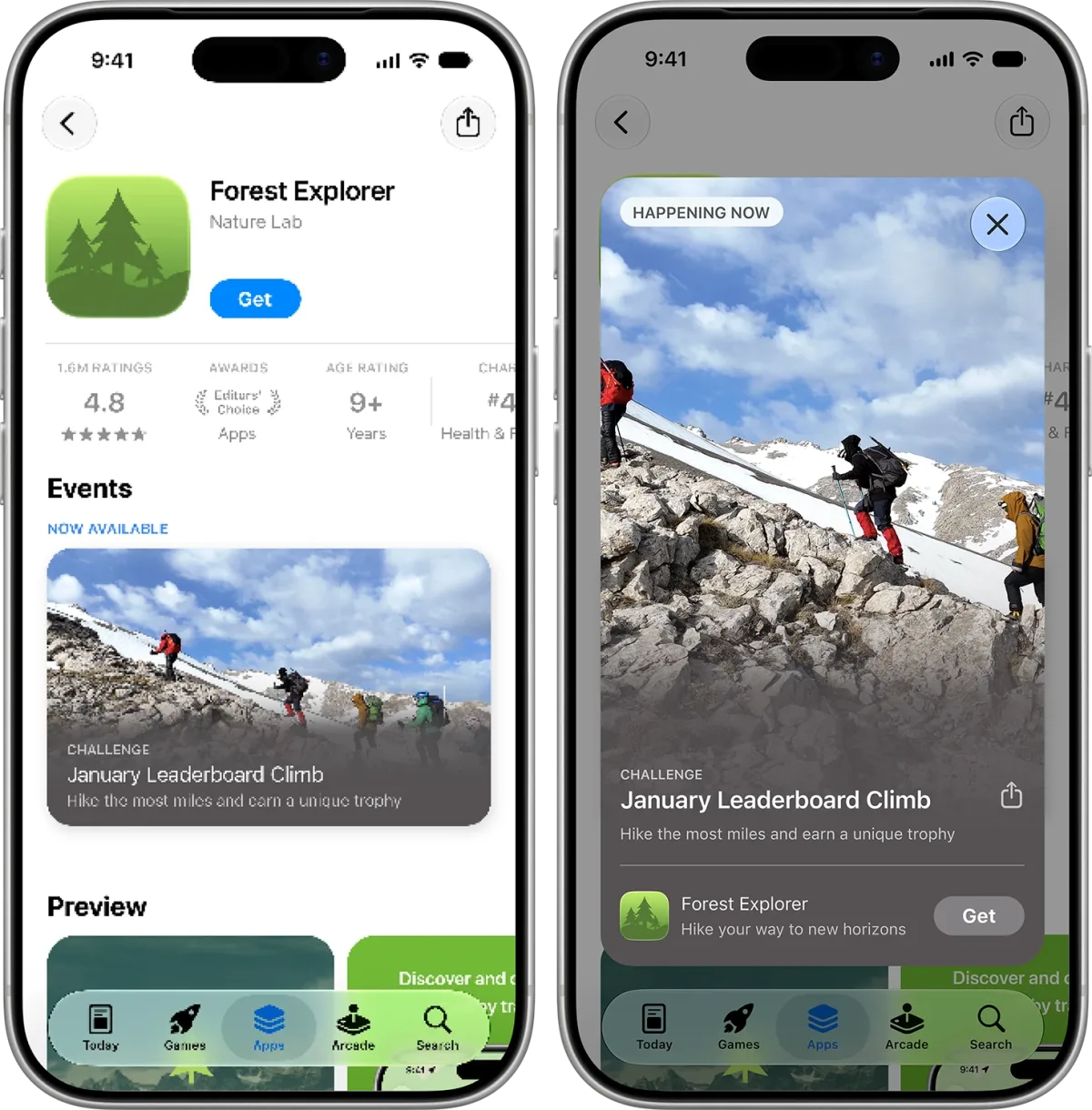
Dikkat edilmesi gereken teknik detay: event kartı 16:9 yatay, event detay sayfası ise 9:16 dikey medya istiyor. İki oran için ayrı tasarım hazırlamak gerekiyor; aynı görseli kırpmak çoğu zaman yetmiyor.
The technical detail to watch: the event card wants 16:9 landscape media and the event details page wants 9:16 portrait. You need a separate design for each ratio; cropping one image into the other rarely works.
03Asset Library: tek merkezden yönetimAsset Library: one place to manage it all
App Store Connect'e yeni bir bölüm eklendi: Asset Library.
App Store Connect gained a new section: the Asset Library.
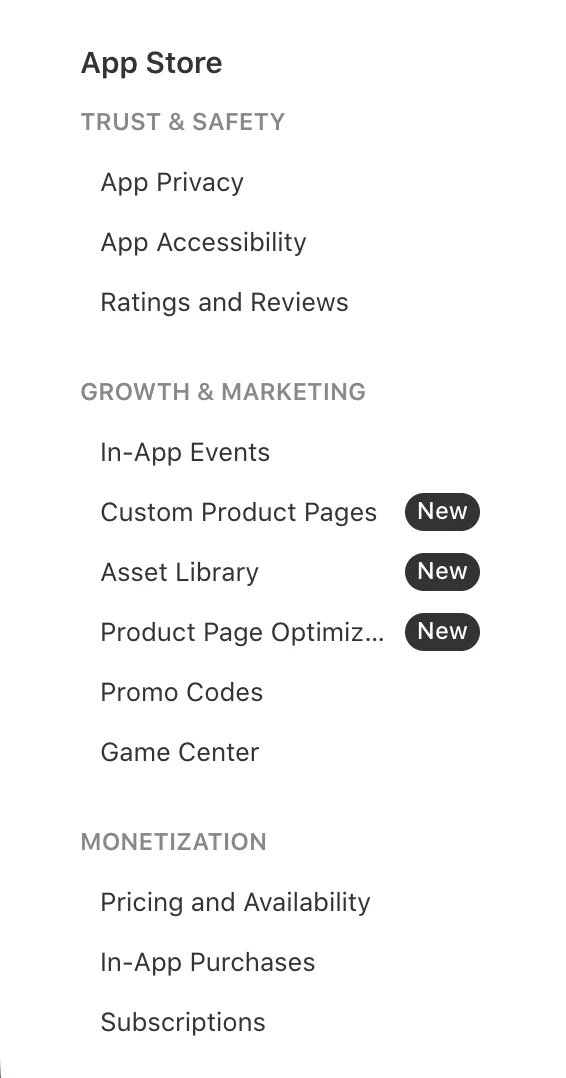
Ekran görüntüleri, app preview'lar ve creative asset'ler artık tek bir merkezde toplanıyor. Asset'leri uygulama sürümünden bağımsız yükleyip önceden onaylatabiliyor, onaylanan bir görseli farklı lokalizasyonlarda, custom product page'lerde, Product Page Optimization testlerinde ve In-App Event'lerde tekrar yüklemeden kullanabiliyorsunuz.
Screenshots, app previews and creative assets now live in one place. You can upload assets independently of an app version and get them approved in advance, then reuse an approved asset across localizations, custom product pages, Product Page Optimization tests and In-App Events without uploading it again.
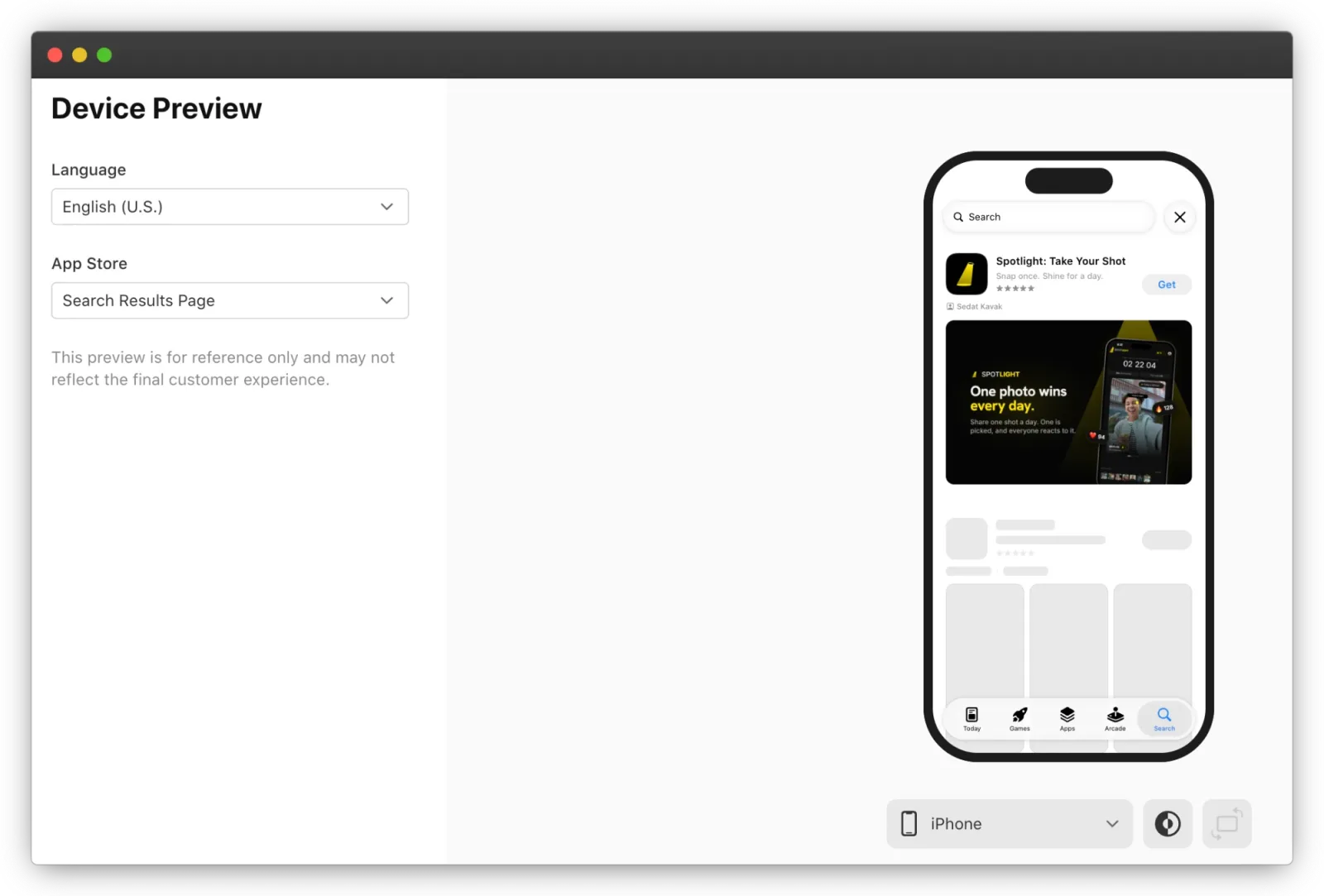
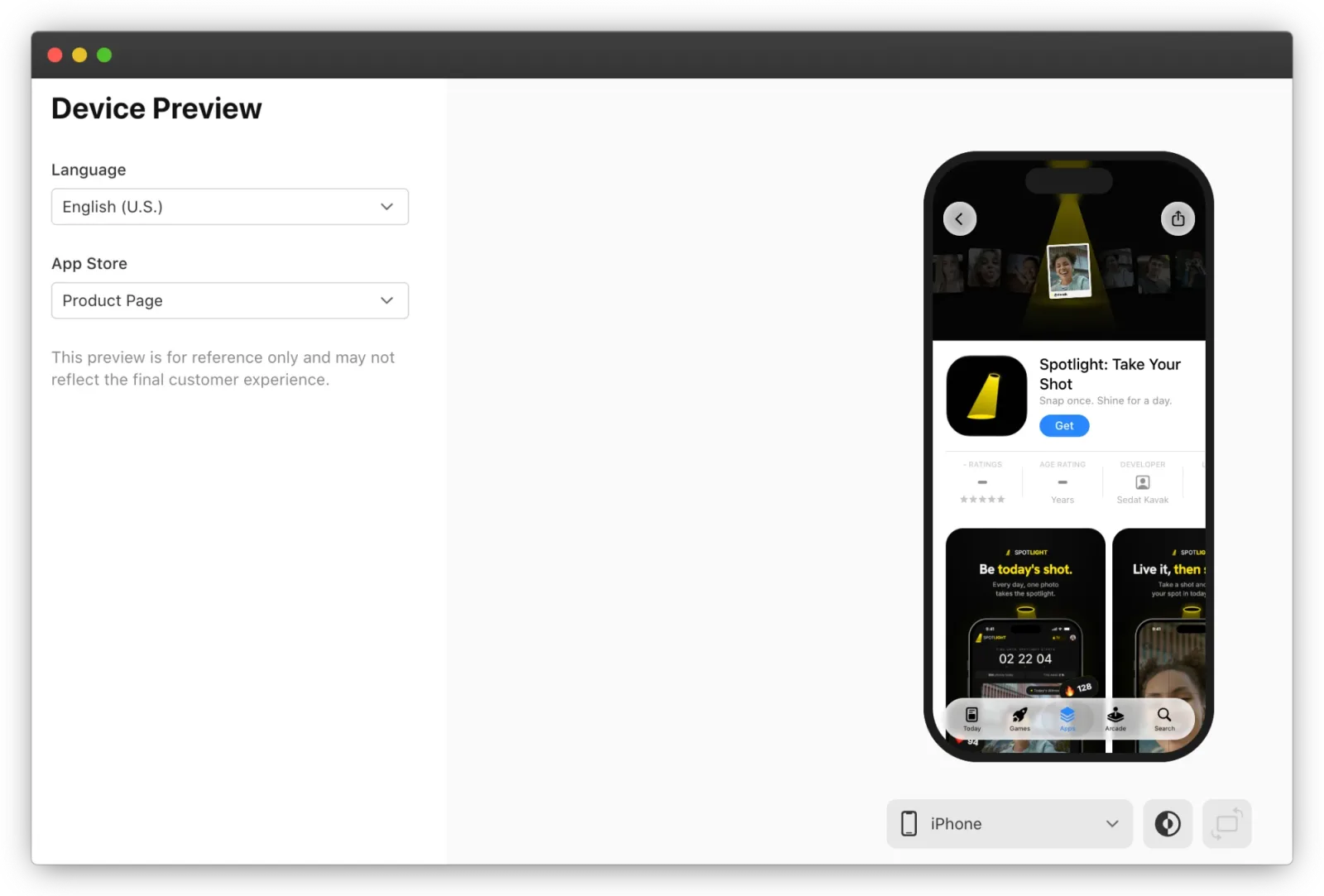
Asset Library ile gelen önizleme aracı da önemli: görselleri göndermeden önce sayfanın gerçekte nasıl görüneceğini, iPhone ve iPad'de, farklı yönlerde ve dillerde simüle ediyor. Hem arama sonucunu hem ürün sayfasını önizleyebiliyorsunuz.
The preview tool that ships with Asset Library matters too: it simulates how the page will actually look before you submit — on iPhone and iPad, across orientations and languages. You can preview both the search result and the product page.
04LokalizasyonLocalization
Bu görsellerin hepsi lokalize edilebiliyor: Türkiye, ABD ve Japonya App Store'u için farklı header'lar tanımlamak mümkün. Görselin üstünde metin varsa, uygulamanın desteklediği her dil için çevrilmesi gerekiyor. Küresel bir kitleniz varsa, her market için ayrı görsel hazırlamak dönüşüm oranına doğrudan yansıyor.
All of these assets can be localized: you can set different headers for the Turkish, US and Japanese App Stores. If an image carries text, it needs translating for every language the app supports. With a global audience, preparing a separate visual per market feeds straight into conversion.
Apple'ın içerik kuralları burada işinizi kolaylaştırıyor: fiyat, URL ve telif hakkı sembolü zaten yasak. O detayları çıkarmak görseli ülkeden ülkeye taşınabilir ve daha uzun ömürlü yapıyor.
Apple's content rules actually help here: prices, URLs and copyright symbols are banned anyway. Stripping those details out makes a visual more portable between countries and longer-lived.
05Tasarım kurallarıDesign rules
Asset'lerin incelenmesinde bakılan kriterler, genel App Review kurallarından ayrı. Reddi en sık getirecek olanlar:
The criteria assets are reviewed against are separate from the general App Review Guidelines. The ones most likely to get you rejected:
| KuralRule | Ne anlama geliyorWhat it means |
|---|---|
| 4+ yaş sınırı4+ age rating | Uygulamanın kendi yaş derecesi ne olursa olsun, App Store'da görünen tüm asset'ler 4+ standardını karşılamalı.Whatever the app's own age rating, every asset shown on the App Store has to meet the 4+ standard. |
| Apple rozetleri yokNo Apple badges | Editors' Choice, App of the Day, Game of the Day, Apple Design Award gibi tanınırlıkları kendi görselinize koymayın — bunlar zaten arama sonucunda ve ürün sayfasında otomatik görünüyor.Do not put recognitions such as Editors' Choice, App of the Day, Game of the Day or Apple Design Award into your own visuals — they already appear automatically in search results and on the product page. |
| Başka platform yokNo other platforms | "Google Play'de de mevcut" gibi ifadeler ya da başka platform ve mağaza logoları kabul edilmiyor.Lines like "also on Google Play", or logos of other platforms and marketplaces, are not accepted. |
| Fiyat, URL, ©Prices, URLs, © | Belirli fiyat ve indirimler, web adresleri, telif hakkı sembolü ve doğrulanmamış ödül iddiaları yasak.Specific prices and discounts, website URLs, copyright symbols and unverified award claims are not allowed. |
Mağaza reddinin genel sebepleri için App Store ve Google Play redleri yazımıza bakabilirsiniz; creative asset'ler o listeye yeni bir başlık ekliyor.
For the general reasons apps get rejected, see our post on App Store and Google Play rejections; creative assets add a new heading to that list.
06ÖzetIn summary
App Store yıllardır statik bir ürün sayfası deneyimi sunuyordu. Creative asset sistemi bunu değiştiriyor: uygulamanız artık hem arama sonuçlarında hem ürün sayfasında kullanıcıyı kendi görsel kimliğiyle karşılıyor.
For years the App Store offered a static product page. The creative asset system changes that: your app now meets users with its own visual identity, both in search results and on the product page.
Bu değişiklik özellikle iki durumda kritik. Aynı kategoride birbirine benzeyen uygulamalar arasında seçim yapan kullanıcı artık ilk görsele göre karar veriyor. Ve yeni bir özellik ya da sezonluk kampanya duyurusunda ürün sayfası artık bir pazarlama alanı.
It matters most in two situations. A user choosing between similar apps in the same category now decides on the first image. And when you announce a new feature or a seasonal campaign, the product page is now a marketing surface.
Görselleri App Store Connect'teki Asset Library üzerinden yönetip, göndermeden önce Device Preview ile test edin. iOS 27 tarafında hazırlanacak tek şey de bu değil: katlanabilir cihazlar için iPhone Duo hazırlığı aynı takvime giriyor.
Manage the visuals through Asset Library in App Store Connect and test them with Device Preview before you submit. And this is not the only iOS 27 work to schedule: getting ready for iPhone Duo lands in the same window.
07Sık sorulanlarFrequently asked questions
Yeni creative asset'ler hangi sürümlerde görünüyor?Which OS versions show the new creative assets?
iOS 27, iPadOS 27 ve sonrasında; ürün sayfasında, arama sonuçlarında ve öne çıkarılan alanlarda. Önceki sürümlerde eski görünüm korunuyor.
iOS 27, iPadOS 27 and later — on the product page, in search results and in featured placements. Earlier versions keep the previous layout.
Arama sonucu görseli zorunlu mu?Is a search results asset required?
Hayır. Eklemezseniz In-App Event'leriniz, app preview'larınız ve ekran görüntüleriniz görünür. Ama rekabetçi bir kategoride boş bırakmak, ilk görseli rakibe bırakmak demek.
No. Without one, your In-App Events, app previews and screenshots appear instead. In a competitive category, though, leaving it empty hands the first image to a competitor.
Header ve arama sonucu için aynı tasarım olur mu?Can the header and the search result share a design?
Evet, universal asset ile. Yalnız iki alanın görevi farklı: arama sonucunda uygulamanın ne yaptığı tek bakışta anlaşılmalı.
Yes, with a universal asset. The two placements do different jobs, though: in search results, what the app does has to be obvious at a glance.
Asset'lerde neler yasak?What is banned in assets?
4+ altı içerik, belirli fiyat ve indirimler, URL'ler, telif hakkı sembolü, doğrulanmamış ödüller, Apple'ın verdiği rozetler ve başka platform logoları.
Anything below 4+, specific prices and discounts, URLs, copyright symbols, unverified awards, Apple-designated badges and other platforms' logos.
In-App Event görselleri hangi oranlarda?What ratios do In-App Event assets use?
Event kartı 16:9 yatay, event detay sayfası 9:16 dikey. İkisi için ayrı tasarım yapın.
The event card is 16:9 landscape and the event details page is 9:16 portrait. Design each separately.